A single street photo shows you one and a half faces of a building. Everything else, the far walls, the rear roof, the corner nobody photographed, has to be made up by the model. I wanted to know which image-to-3D tool makes that part up correctly, so I gave Meshy 7.1 Flagship and SupaVoxel the same photo of a brick house on the same day, downloaded both GLB files, and rendered them side by side from identical cameras under identical lights. The only thing that changes inside each image pair below is the model.
The short version: from the front, the two are level. Turn the house around and they stop being comparable.
The scorecard first
I rated eight dimensions on a ten-point scale and rolled them into an overall verdict: Meshy 60/100, SupaVoxel 90/100. Each row points to the evidence further down.
| Dimension | Meshy | SupaVoxel | Evidence |
|---|---|---|---|
| Photographed facade | 8/10 | 8/10 | Both resolve the leaded sashes, brick band, heads and sills from one JPEG |
| Invented rear | 2/10 | 9/10 | Meshy's rear roof has no dormer; SupaVoxel builds one in line with the front |
| Object isolation | 1/10 | 10/10 | Meshy fuses tree, car, pedestrians and sidewalk into one mesh with one material |
| Topology | 3/10 | 9/10 | 6,056,056 vs 1,499,830 triangles; Meshy's window rows tilt and drift |
| Cost | 3/10 | 10/10 | 35 credits in two charges (60 if the Texture toggle catches you) vs 3 credits once |
| Deliverable weight | 2/10 | 10/10 | 184.9 MB uncompressed vs 15.2 MB compressed |
| Export range | 10/10 | 6/10 | Meshy: GLB, FBX, OBJ, USDZ, STL, BLEND, 3MF, DXF. SupaVoxel: GLB, OBJ, STL, USDZ, 3MF |
| Honest time estimates | 3/10 | 8/10 | Meshy: "2 min", took 4.5 to 10 min. SupaVoxel: "5–10 minutes", took 4 min 55 s |
Meshy wins exactly one row, and it wins it outright: nobody else in this test offers FBX, BLEND or DXF. If your pipeline ends in one of those formats, that matters. For everything else about turning a photo of a real building into a model you can walk around, SupaVoxel was the clear pick.
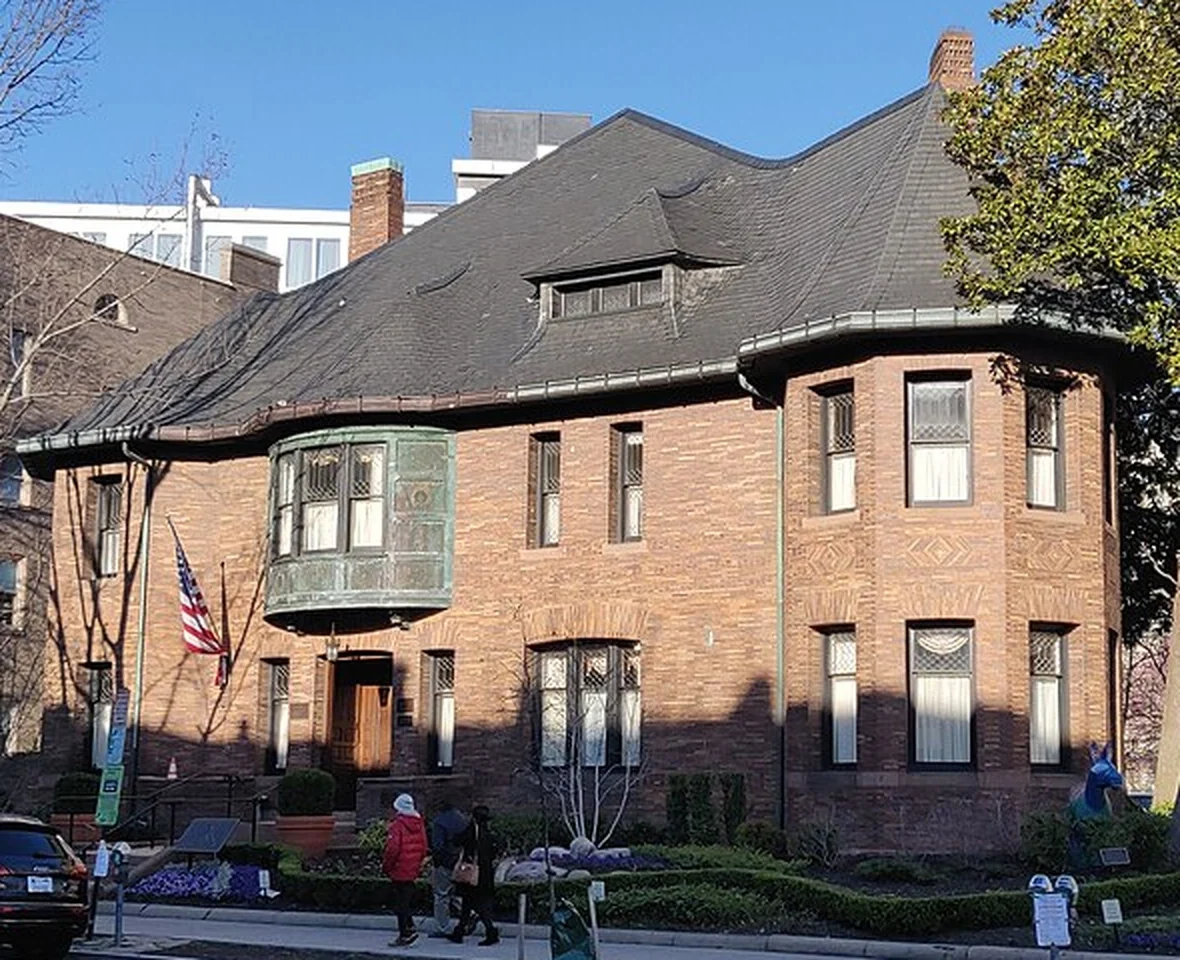 The only input either tool saw: a Wikimedia Commons crop of the Whittemore House front, clutter left in on purpose because real photos have cars in them.
Why I tested a house and not a figurine
Most image-to-3D comparisons use a character, a shoe or a toy. Those are forgiving subjects: you look at them from roughly where the camera stood, and a mushy back side rarely gets noticed. A building is the opposite. Its value as a model depends on being able to see it from every side, and a single photo leaves more than half of it undocumented.
So the real question is not "how sharp is the front?" but "what did the model decide the back looks like?" That is the half people rarely screenshot, and it is where this test was decided.
What each run cost and returned
These numbers come from the account balances, not from pricing pages.
- Meshy, geometry only: 25 credits (balance 1,100 to 1,075), 74 seconds, 2,046,180 triangles. The file has no textures and no UV channel; I opened it to check, and there is no
TEXCOORD_0at all. - Meshy, geometry plus texture: 35 credits (1,075 to 1,040), charged as 25 plus 10. Geometry took about 58 seconds; the texture pass then ran 4.5 to 10 minutes against an on-screen estimate of 2 minutes.
- SupaVoxel: 3 credits (391 to 388), a single charge, 295 seconds, textured without any extra step.
The first Meshy run is the one to watch out for. Texture is switched off by default, and the button shows you the price without making it obvious that the result will be bare. I paid 25 credits for a white house, then 35 more for the textured one, so my first usable Meshy model cost 60 credits against SupaVoxel's 3. The credits-and-colour side of this is covered in detail in the texture toggle and colour drift write-up; here I'll stay on shape.
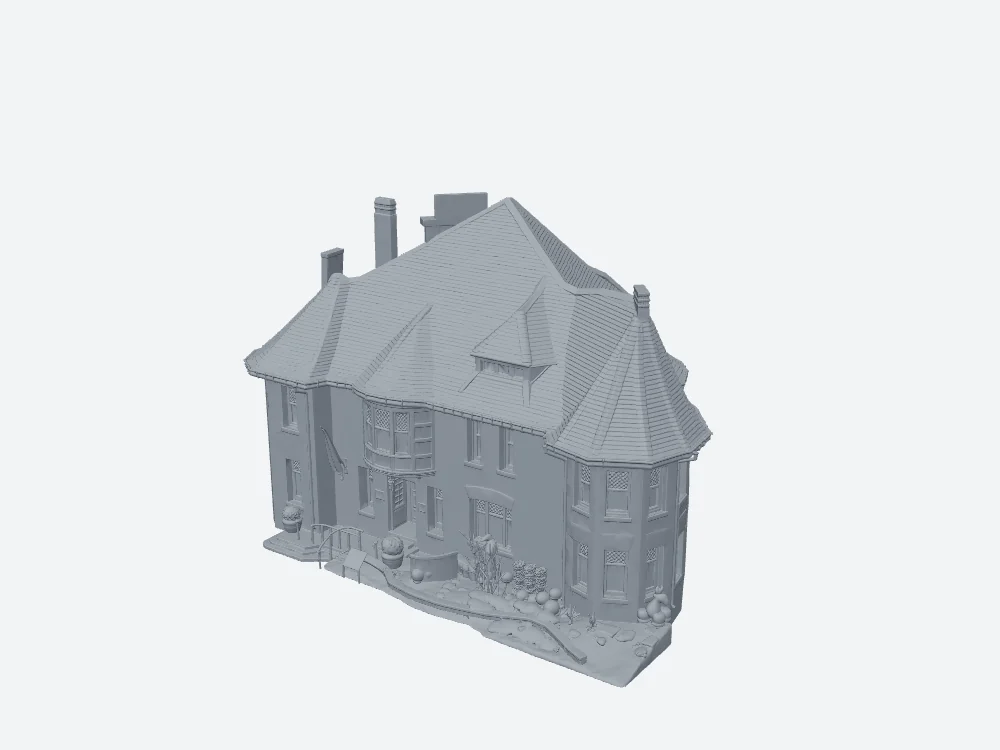 Meshy on default settings: a respectable massing model, but untextured and without UVs, so the colour pass has to be bought separately.
Front elevation: honestly a draw
Credit where it is due. On the face the camera actually photographed, Meshy 7.1 does very good work. The leaded upper sashes are there, the carved diamond band in the brick reads clearly, and the window heads and sill courses sit where they should. Getting that from one JPEG is impressive.
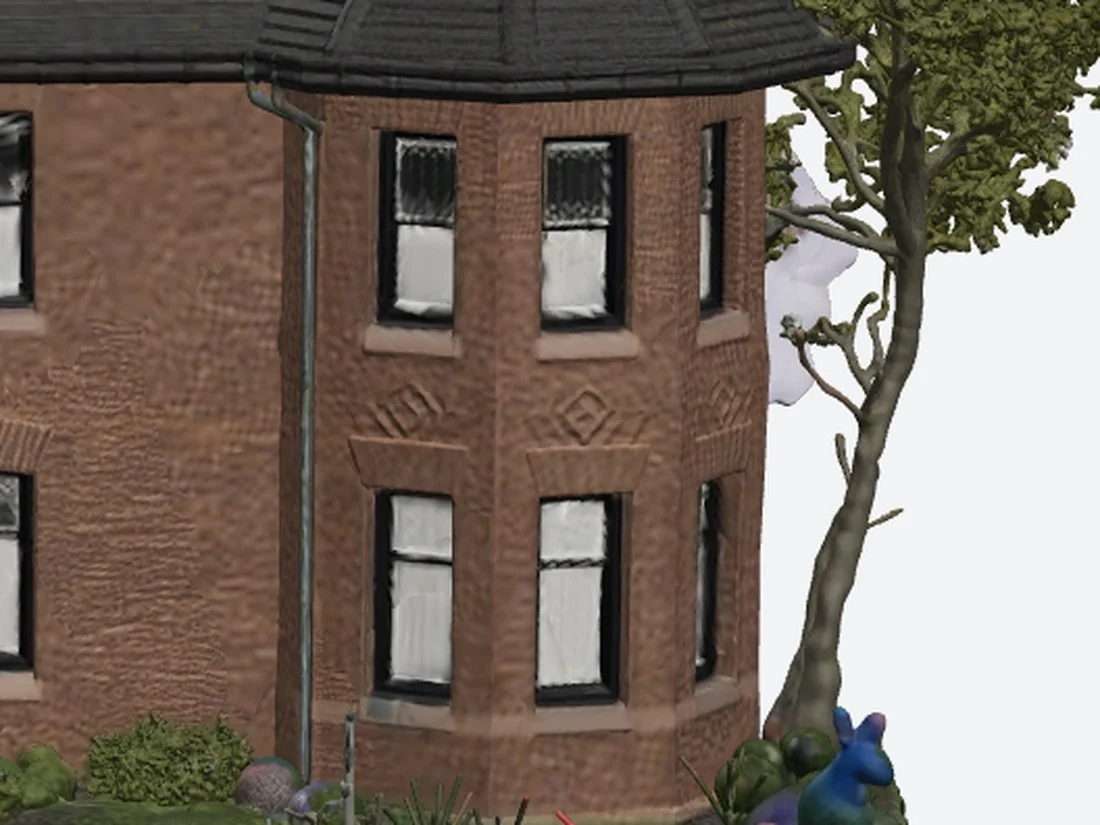 Meshy's front corner: sharp and faithful to the photo. Keep this image in mind, because the rear corner of the same file appears a few sections down.
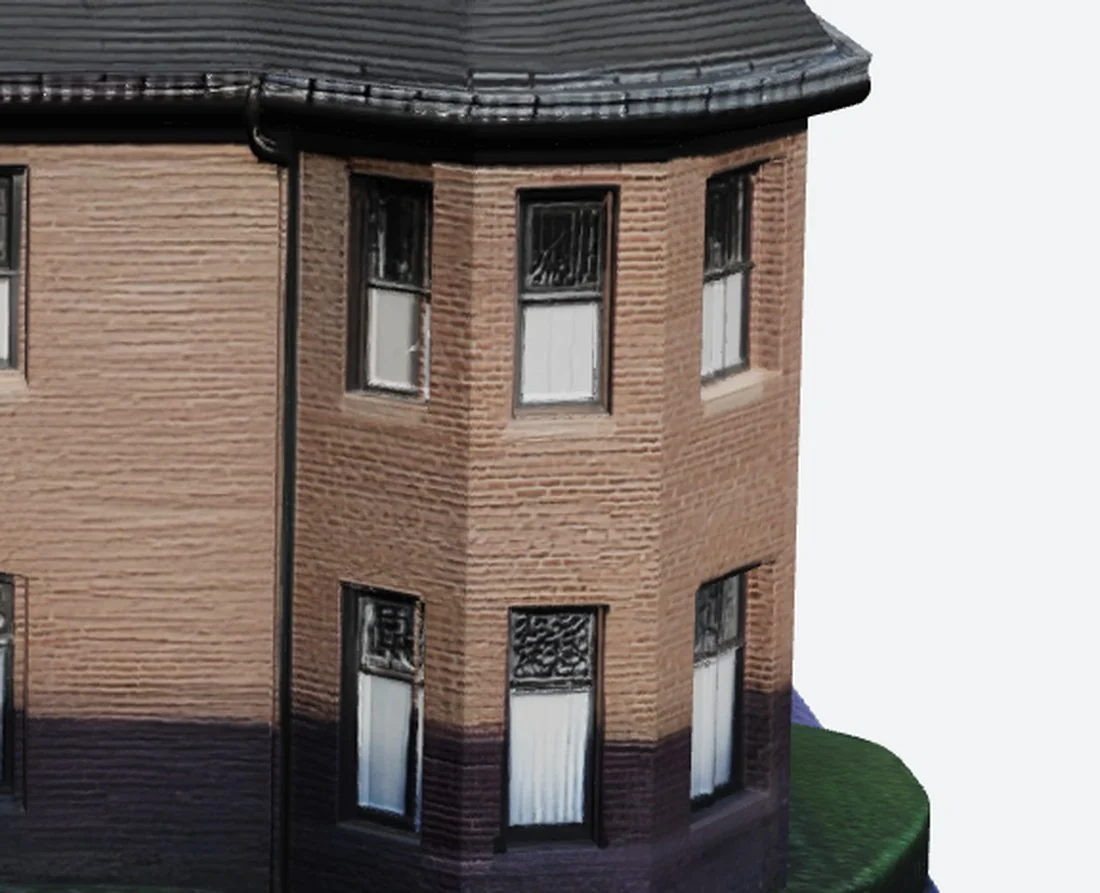 SupaVoxel's front corner, same camera: brick courses you can count, an unbroken sill line, both storeys lined up. Neither tool stumbles on the visible side.
Rear roof: where the dormer disappears
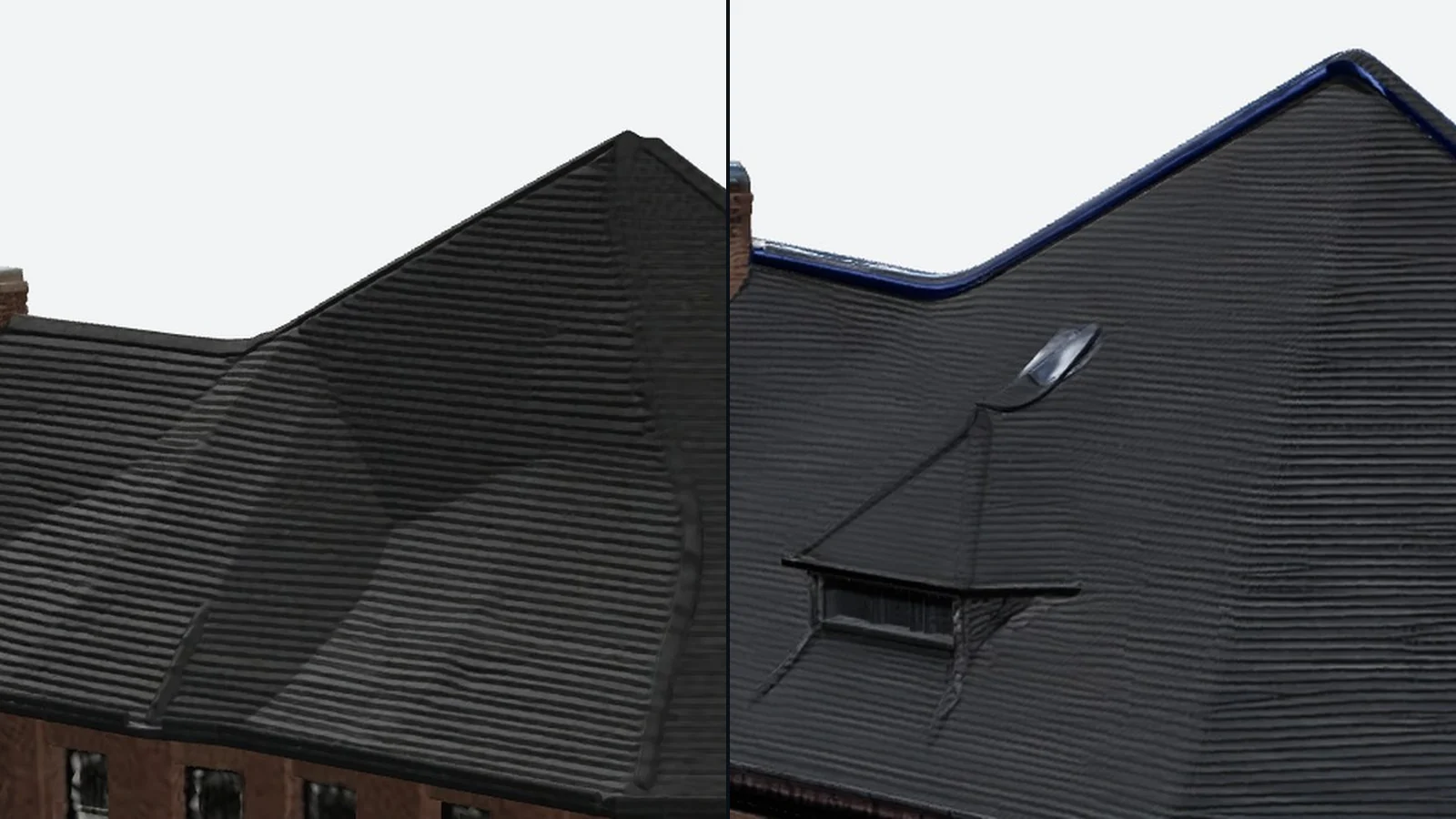
This is the comparison that settles it. The front roof of the house carries a row of dormers, and Meshy reproduces them. On the back slope, Meshy produces no dormer at all.
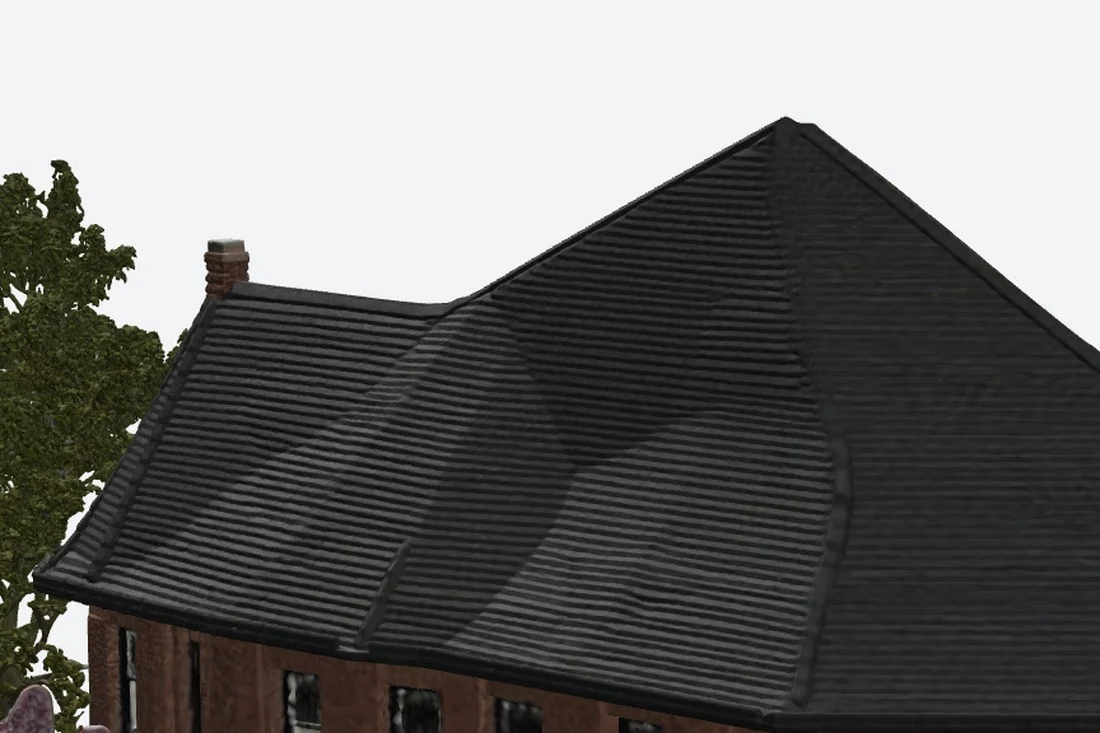 Meshy's rear roof: one smooth plane with a few collapsed dents, a tree that sprouts from nowhere on the left, and a smear of purple noise beside it.
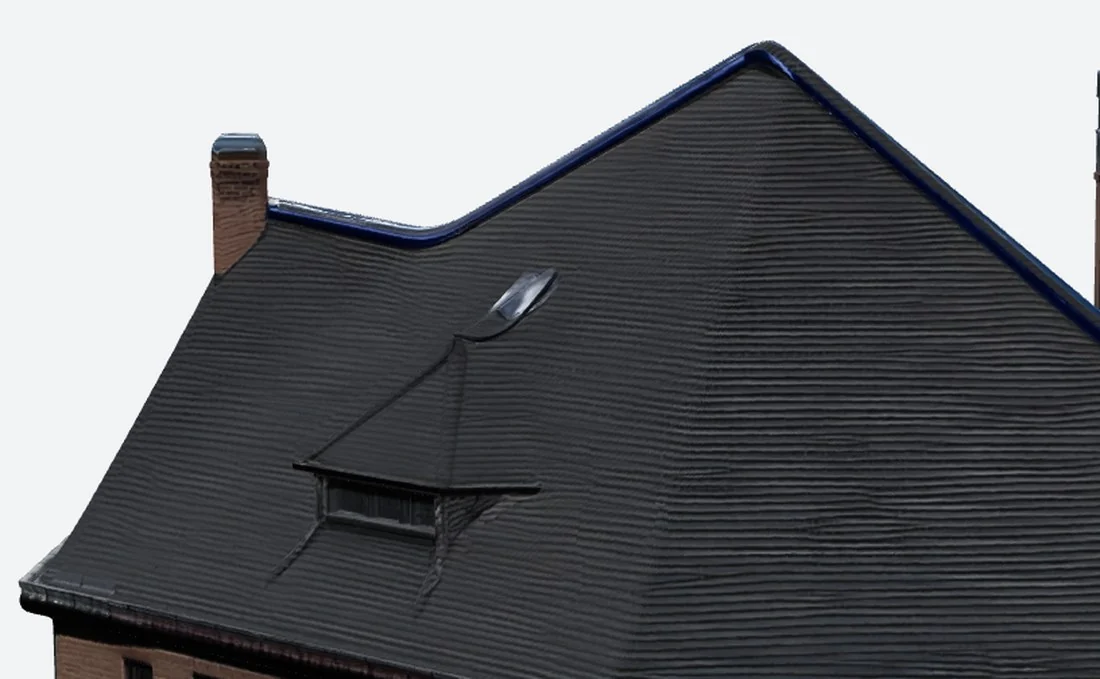 SupaVoxel's rear roof, same camera: a full dormer with pitched hood, cheeks, frame and dark glass, placed at the height and spacing of the front ones, plus a straight ridge and visible mortar in the chimney.
It is tempting to call this a texture problem, but it isn't. There is no dormer shape to paint over; the geometry simply is not there. Whatever you want this model for, a listing visual, a game street, a printed miniature, it only works when viewed from the front.
The full rear elevation tells the same story at a wider angle.
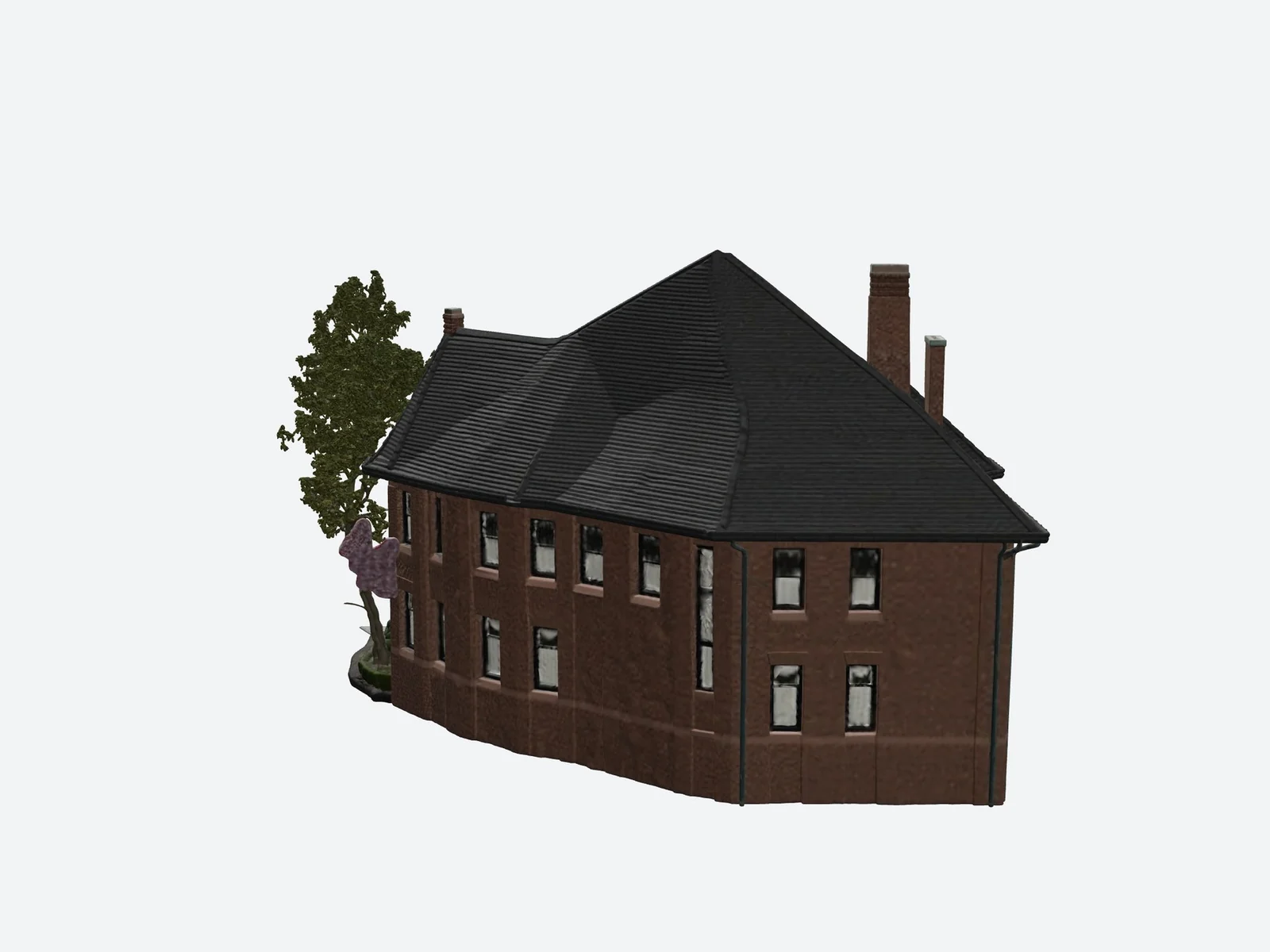 Meshy from behind: windows reduced to smudges, a wall visibly darker than its own front, a shredded ground edge, and invented foliage on the left.
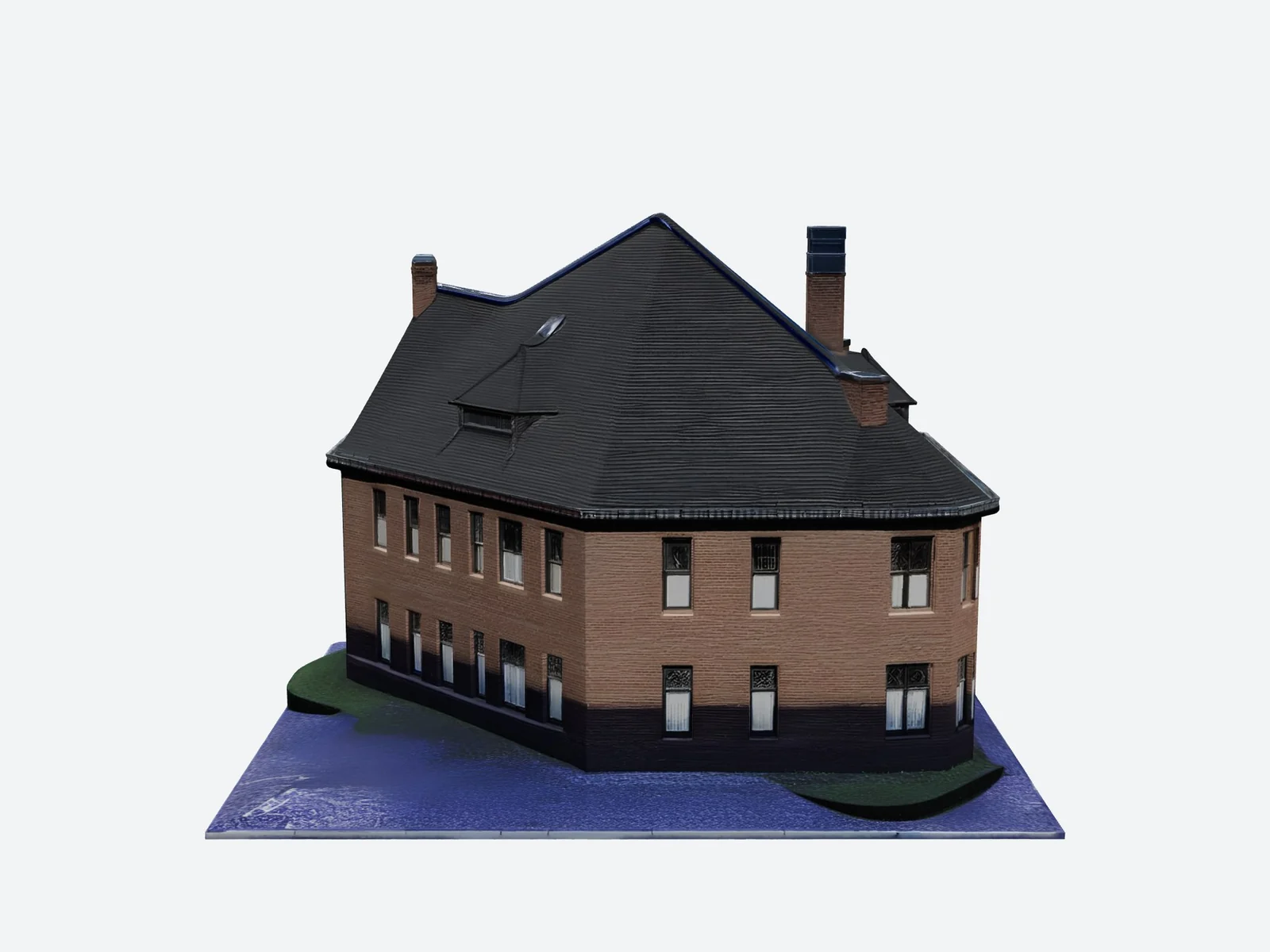 SupaVoxel from behind: regular window rows, brick that matches the front, the dormer in place and a clean base-plate edge. It reads as the same house seen from the garden.
One file, two different houses
Put Meshy's rear corner next to its own front corner and it is hard to believe they came from the same file.
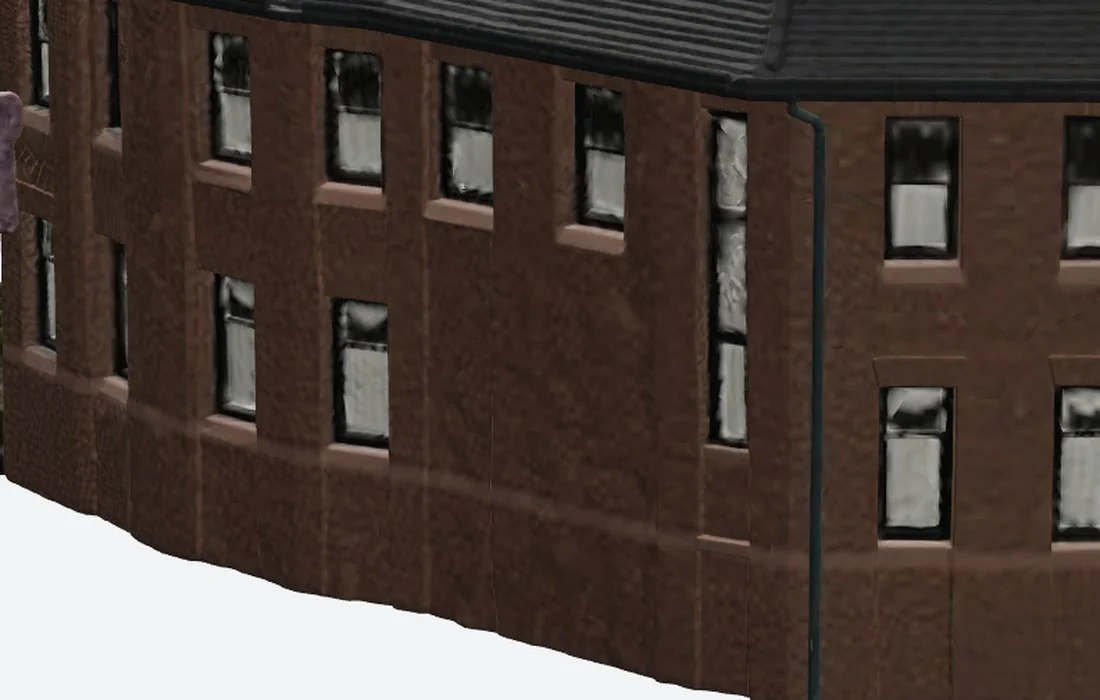 Meshy's rear corner: the leaded panes are gone, the frames have no depth, the mortar looks like embossed leather, the wall bows outward and the base sags in a wave.
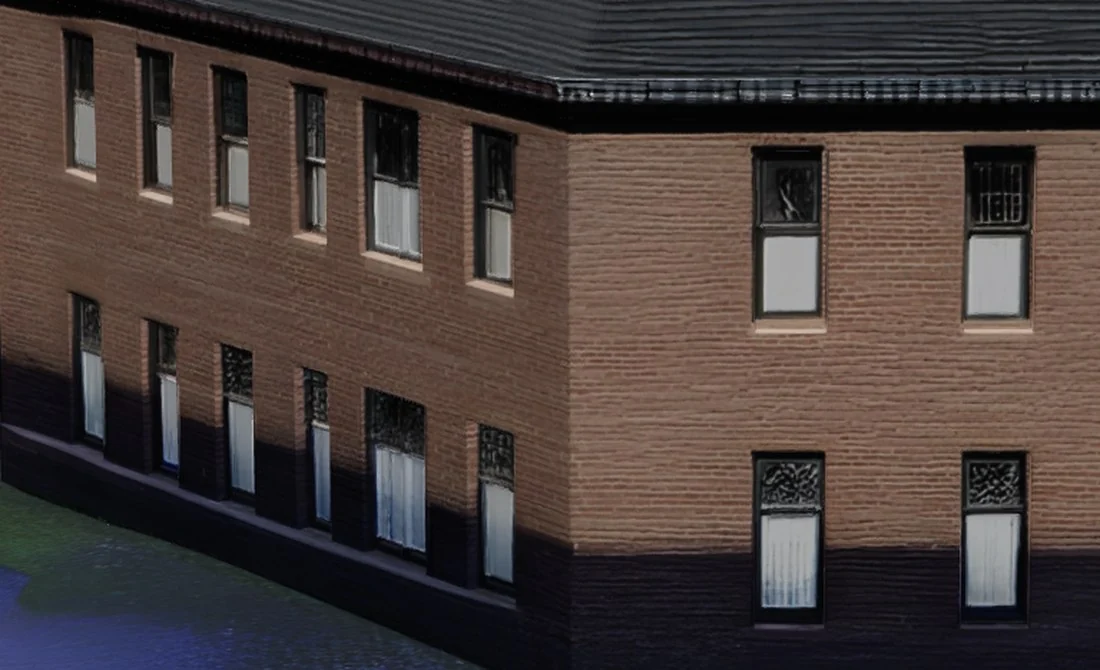 SupaVoxel's invented rear corner: the same leaded upper sash, white lower sash, heads and sills as its front, with the brick courses and dark base band carrying round.
My read on the cause is structural rather than cosmetic. Meshy stretches what it can see; it does not complete what it cannot see. SupaVoxel behaves as if it knows what a house is supposed to contain, so the parts it has to invent are parts the building already has on its other sides.
The wireframe: four times the triangles, less order
Meshy's textured file holds 6,056,056 triangles; SupaVoxel's holds 1,499,830, roughly a quarter. I expected the bigger budget to show up as cleaner structure. It shows up as noise.
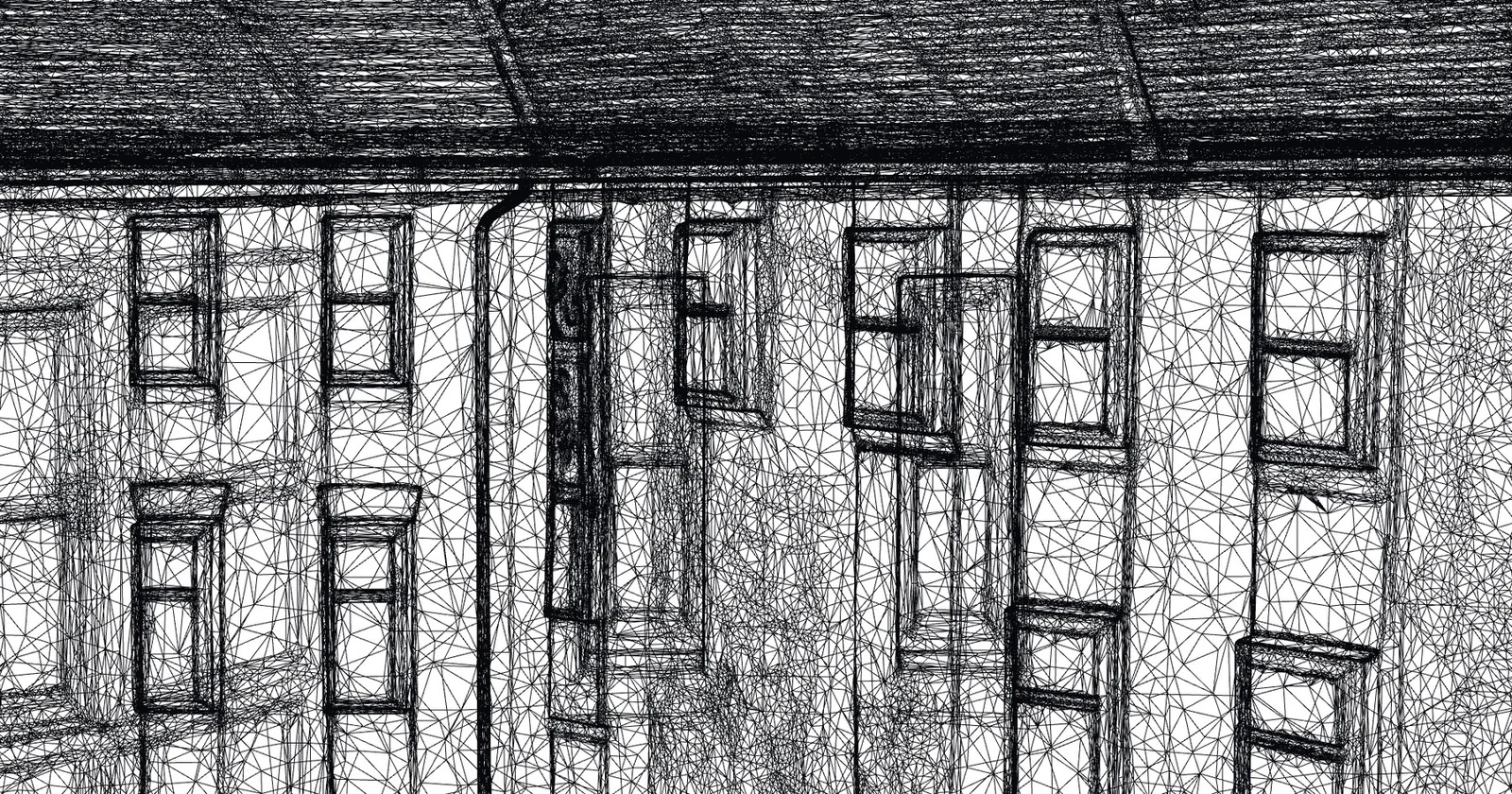 Meshy's wireframe, 6,056,056 triangles: windows in a single row each tilt at their own angle and drift downward, frames are ringed with slivers, long noise triangles cross several windows, and the roof is dense enough to read as solid black.
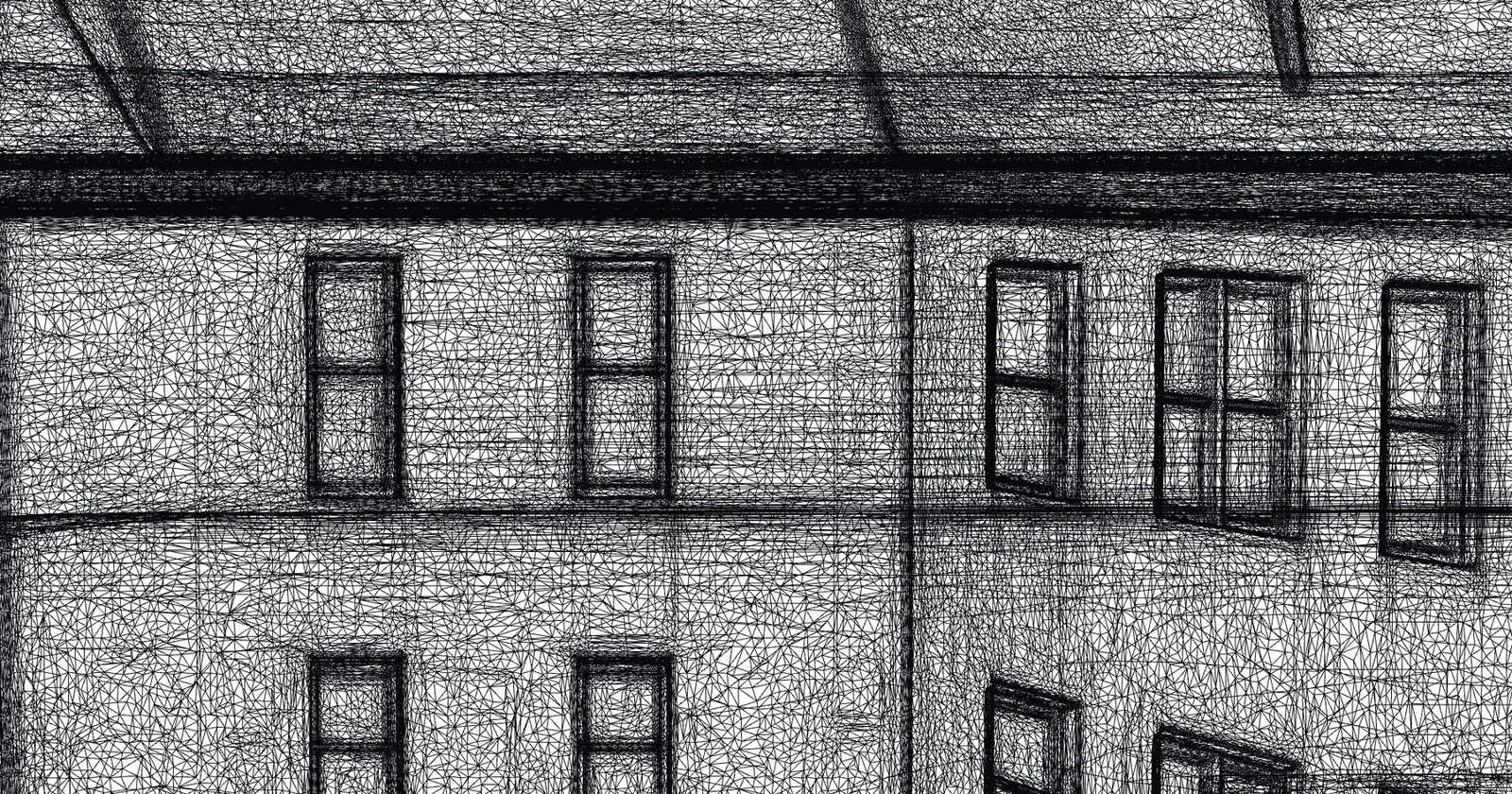 SupaVoxel's wireframe, 1,499,830 triangles: square openings, each row of windows on one horizontal line, frames as continuous polylines, and the eaves and belt course drawn with a few long straight edges.
Same camera, same zoom, pure wireframe in both. Meshy spends about 4× the triangles and gets less structure out of each one. Those extra triangles are also the main reason the file weighs what it does; the delivery side of that, from download times to bandwidth bills, is in the 185 MB vs 15.2 MB file-size comparison.
The street came along for the ride
The photo had a tree, a parked car, two pedestrians and a stretch of sidewalk in it. Meshy rebuilt all of it.
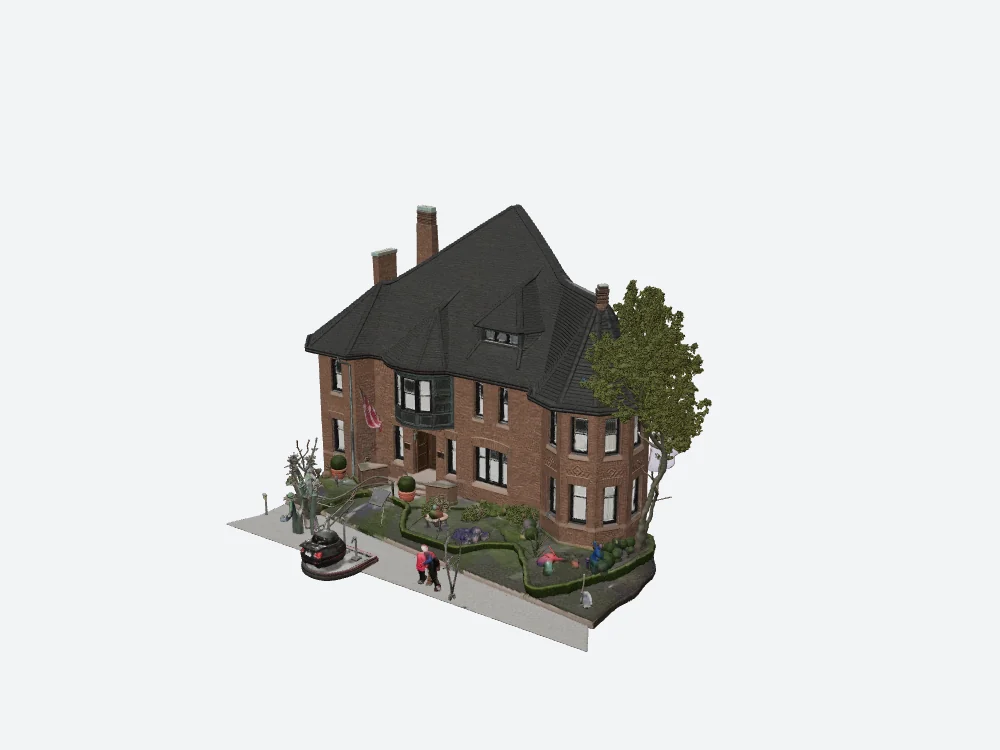 Meshy's textured result: the house, a car melted into a dark red lump, two pedestrians turned into coloured posts with white blurs for faces, a floating tree, a flagpole and a row of shapes I can't identify.
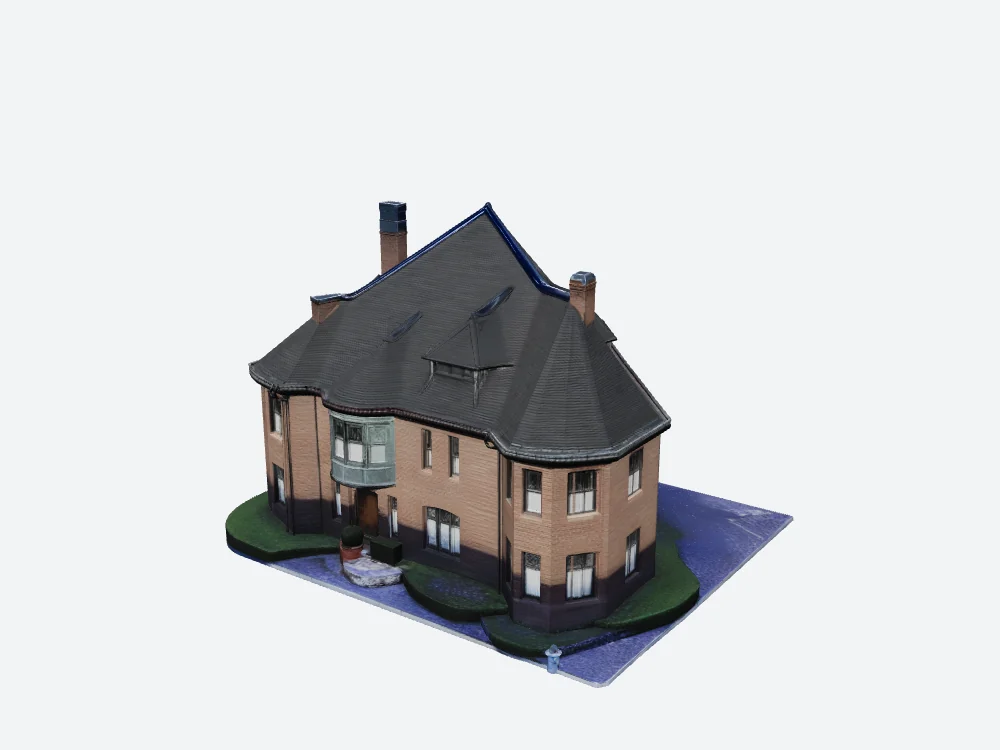 SupaVoxel's result: just the building on a base plate with lawn and driveway. The steps, planters and a topiary ball stay; the car, people and street furniture are gone.
Inside Meshy's GLB there is one mesh and one material. The car shares a material with the brick wall. You can try selecting loose parts in Blender and hope the car comes away cleanly, but nothing in the file guarantees it will, and whatever you do delete, you have already paid for in triangles and texture space.
What this means if you want to 3D print the house
Both tools export STL and 3MF, so either can hand a file to a slicer. The structural results above translate directly into what comes off the print bed.
- The back of the print is what the geometry says it is. On a printed model, texture does not exist; only shape does. Meshy's rear roof has no dormer mesh, so a printed Meshy house will have a blank rear roof slope. SupaVoxel's rear dormer is real geometry and will print as a dormer.
- The car and the people print too. Because Meshy reconstructed the whole scene, the melted car, the two pedestrians, the tree and the flagpole are part of the model. Send it to the slicer as is and they come out attached to the house.
- You cannot peel them off by material. With one mesh and one material, there is no material boundary to split along. Removing the clutter is manual mesh surgery before printing, and on a fused model there is no guarantee it separates cleanly.
- The wavy, sagging surfaces are physical now. On screen, Meshy's bulging rear wall, wandering window rows and sagging base are rendering flaws. On a print, they are the shape of the object.
- A clean footprint helps. SupaVoxel delivers the building on a base plate with a tidy edge. Meshy's ground edge is ragged at the back, which is the part of the model that would sit on or near the bed.
- Triangle count is a slicer cost. Meshy's textured model carries 6,056,056 triangles against SupaVoxel's 1,499,830. For a single-colour print, most of that extra density buys you nothing you can hold.
One nuance for printers: if you only want an unpainted print, the missing texture on Meshy's 25-credit geometry-only run (2,046,180 triangles) matters much less. That was a separate generation, though, and I only ran the full turnaround comparison on the textured model, so I can't vouch for how its rear roof came out.
Where Meshy still earns its place
A fair summary has to include what Meshy does well:
- The widest export list here: GLB, FBX, OBJ, USDZ, STL, BLEND, 3MF and DXF, with real-world size and origin controls.
- Excellent detail on any surface the photo actually shows.
- Geometry in 58 to 74 seconds, inside its own estimate.
- Credit prices displayed before you commit.
And what went wrong on this building:
- No dormer on the invented rear roof; rear windows reduced to smudges.
- The whole street merged into the model as one mesh with one material.
- About 4× the triangles with worse topology.
- Texture off by default, so the first paid run has neither materials nor UVs.
- A 184.9 MB file with no compression extensions.
- A texture pass that ran well past its "2 min" estimate.
Pricing for a building like this
Meshy's plans as of September 2026: Free at $0 with 100 credits a month, Pro at $20 a month for 1,000, Premium at $40 a month for 3,000, Ultra at $100 a month for 8,000, around 20% off annually, with credits resetting each month and free downloads under CC BY 4.0 subject to a monthly download cap.
At 35 credits per textured building, or 60 if the toggle trips you up, the free plan covers one finished building and one mistake a month. SupaVoxel charged 3 credits for the same photo and offers 3 free models a day without a card, with credits that don't expire. At a hundred buildings, that is 3,500 credits against 300.
SupaVoxel's one gap in this test: no FBX export, so a studio working in Maya or 3ds Max has to route through Blender.
Verdict
Meshy 7.1 behaves like a photo reconstructor, not a building modeller. It lands at 60/100 because the facade detail and the export list are genuinely strong, and because everything that depends on understanding the building as an object, the rear roof, consistent windows, isolating the house from the street, clean topology, came back broken. SupaVoxel lands at 90/100 because it got those things right on the identical photo, for 3 credits, in one step.
If you need FBX, BLEND or DXF out the other end, Meshy is the tool that has them. For taking one photo of a real building and getting a model you can rotate, or print, all the way round, I'd start with SupaVoxel.
You can check this yourself on any building you know: generate it, then spin the result 180 degrees. That one rotation shows most of what this comparison found.
More from this building test
Same photo, same two tools, same day, different angle:
- Meshy vs SupaVoxel on file size: 185 MB vs 15.2 MB for one house: compression, download times and what the heavier file costs to serve.
- Meshy vs SupaVoxel on texture, credits and colour: the default-off Texture toggle, where the credits go, and how far the wall colour drifts from the photo.