Readers searching for image to stl tools can use this independent comparison of Tripo AI and SupaVoxel to assess cost, speed, limits, and whether the resulting mesh is ready for printing.
This is an independent test. Nothing here came from vendor access: both tools were used on my own free and paid accounts.
My verdict in 60 seconds — Tripo 58/100, SupaVoxel 91/100
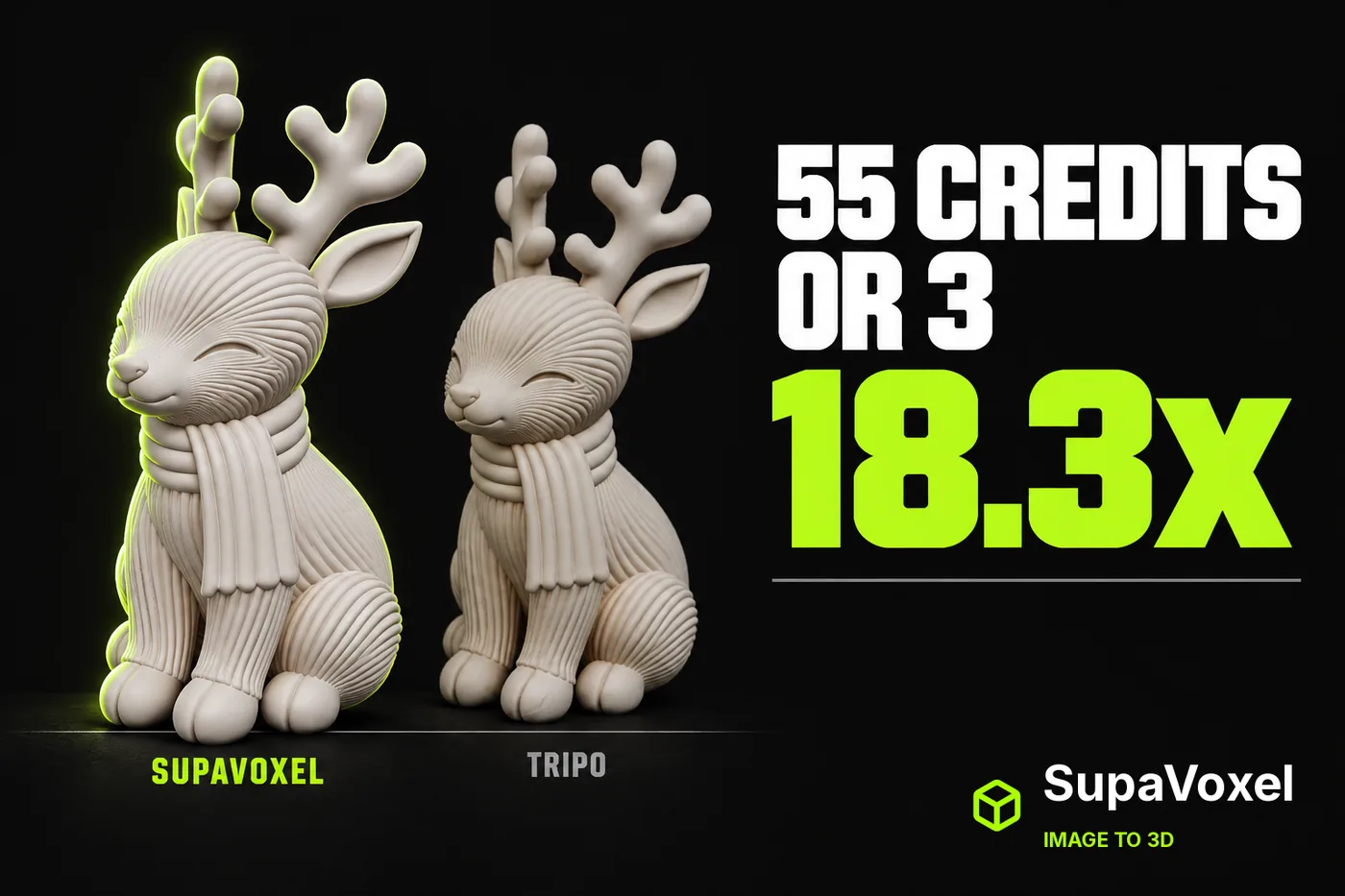
Same photograph, same day, two image-to-3D products: a seated chibi reindeer in a corduroy scarf. Tripo charged 55 credits. SupaVoxel charged 3. On this subject Tripo was faster on raw wall clock — 157.0 seconds against 258.3 — and I am going to give Tripo that row properly rather than explain it away. Two things stop it being a general speed win: across the ten subjects I ran, SupaVoxel was the faster tool on seven of them, and here the 101 seconds cost 52 extra credits, a mesh that arrives non-watertight with inconsistent winding, and 6.45× the bytes to download.
Here is the scorecard for this one job: what it costs to turn a photo into a printable figurine.
- Credits per generation — Tripo 2/10 (55) · SupaVoxel 10/10 (3) — 18.3×, same photo, same defaults
- Price visible before upload — Tripo 3/10 (hidden) · SupaVoxel 10/10 (on the button) — Tripo's button says Generate until you upload, then Generate 55
- When the charge lands — Tripo 4/10 (on submit, 870 → 815) · SupaVoxel 8/10 (nothing charged while running) — Tripo takes it before you see a result
- Rate limits — Tripo 10/10 (0) · SupaVoxel 10/10 (0) — genuine tie, neither caps you
- Rationed switches — Tripo 3/10 (3 trial-limited) · SupaVoxel 10/10 (0) — Clean Topology Trial ×2, Generate in Parts ×1, 8K Texture ×1
- Wall clock, this subject — Tripo 9/10 (157.0 s) · SupaVoxel 6/10 (258.3 s) — Tripo wins this subject; SupaVoxel won 7 of the 10 I ran
- Wall clock, predictability — Tripo 10/10 (135–189 s across ten) · SupaVoxel 4/10 (100.2–867.4 s) — Tripo's spread is 54 s against 767 s
- Batch of 100 — Tripo 2/10 (5,500 credits, 6.46 GB) · SupaVoxel 10/10 (300 credits, 1.00 GB)
- Reference images per run — Tripo not measured · SupaVoxel 9/10 (5 slots) — 1 Main plus 4 supplementary angles
Part by part, what the money actually buys:
- Tripo won the clock on this subject and that is real: 157.0 seconds against 258.3, a 101-second margin. Across ten subjects, though, SupaVoxel was faster on seven and about 30 s quicker on median — Tripo's advantage is consistency, not speed.
- Tripo takes the 55 credits at submit, not at completion — the balance went 870 → 815 while the viewport still read Generating.
- Tripo's price is not on the button until you have uploaded an image; SupaVoxel's reads Generate (3 credits) before you upload anything.
- The Tripo mesh that arrives after those 157 seconds is not watertight, has inconsistent winding and comes in two pieces — so the wall-clock win is measured to the wrong finish line.
For this job — one photo, one printable figurine, done more than once — use SupaVoxel.
 The only input: one 1,517,781 B PNG, sha256 8ba545f2…, handed to both products unmodified on default settings. One photo, two invoices: 55 credits and 3.
The test, in one paragraph
One photo, two products, one day, both left on shipped defaults. Tripo Studio: Best Quality on, Clean Topology off. SupaVoxel: full model, Inference Steps 5, Guidance Scale 5.5, Octree Resolution 256. Both GLBs parsed offline. Credit figures come from the on-screen balances before and after each run, not from a pricing page.
55 credits against 3, for the same photograph
This is the headline number and it does not need interpretation. Tripo deducted 55 credits. SupaVoxel deducted 3. That is 18.3× for the same input, the same day, the same default settings, producing a figurine of the same object at the same target height.
- Credits, one generation — Tripo 55 · SupaVoxel 3 · 18.3×
- Credits, 100 generations — Tripo 5,500 · SupaVoxel 300 · 5,200 difference
- Rate limits or daily caps observed — Tripo 0 · SupaVoxel 0
That last row is a genuine tie worth saying out loud: neither product throttled the run or imposed a visible daily cap. The difference is entirely price per unit.
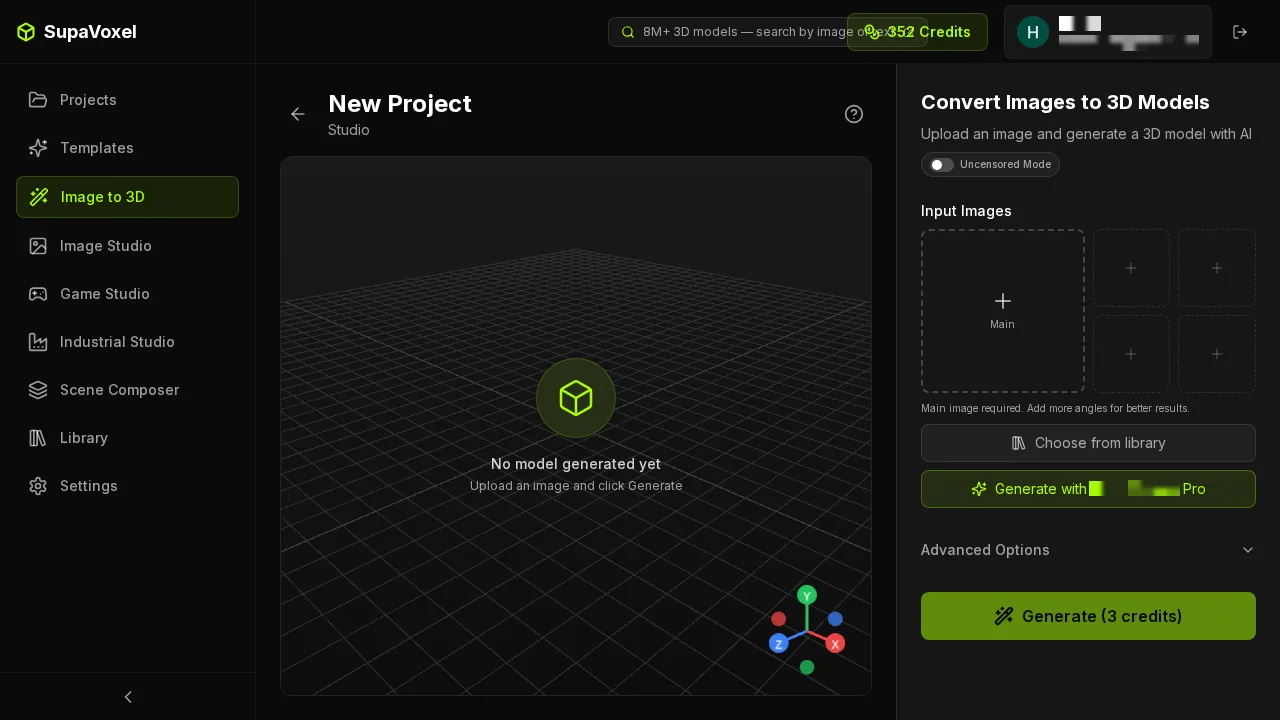 The SupaVoxel studio before anything is uploaded. The button already reads Generate (3 credits), and the Input Images panel offers five slots — one Main plus four supplementary angles. The price does not move after upload.
 Tripo Studio at the same moment. The button reads Generate with an arrow and no number. Beside the quality selector, Clean Topology carries a Trial ×2 badge and is not selected by default. A promotional bubble covers part of the top bar and a third-party ad strip sits along the bottom.
The price does not appear until you have uploaded
This is the part that irritated me most. On Tripo the generate button carries no number at all until an image is in the frame. Upload the reindeer and the button becomes Generate 55. The 18.3× gap only reveals itself at the step where you have already committed the photo.
The SupaVoxel button reads Generate (3 credits) on an empty studio. You know the price before you know whether you want the thing.
- Price shown before upload — Tripo no · SupaVoxel yes (3 credits)
- Price shown after upload — Tripo 55 · SupaVoxel 3
- Change in displayed price after upload — Tripo 0 → 55 · SupaVoxel 3 → 3
 Tripo with the photo uploaded. Only now does the button read Generate 55, with the balance at 870 in the top bar. The quality selector is still on Best Quality and Clean Topology Trial ×2 is still unselected — this run used Tripo's default throughout.
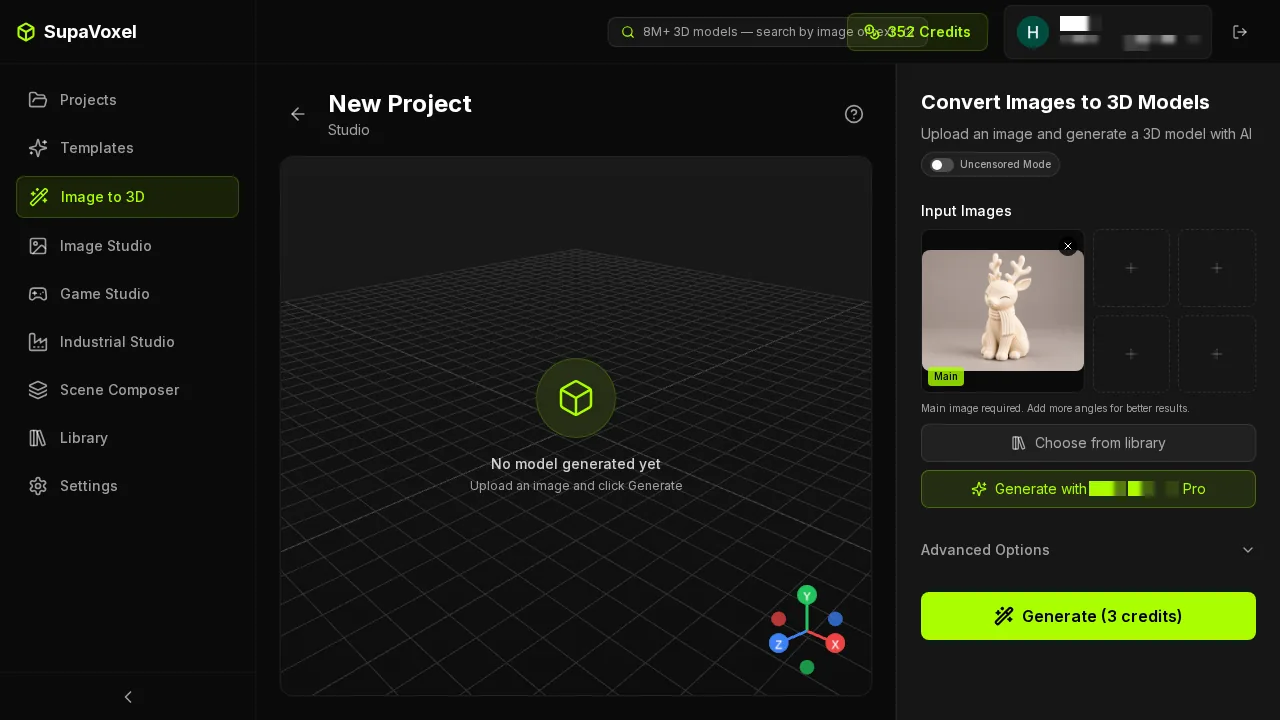 SupaVoxel with the same photo in the Main slot. The button still reads Generate (3 credits) — not one character changed on upload — with the balance of 352 visible for reconciliation.
The 55 credits are taken on submit, not on delivery
I watched the balance across two screenshots. Before generation, Tripo's top bar read 870. During generation, with the viewport still showing Generating and no model in existence, it read 815. The 55 credits were gone before there was anything to charge for.
Tripo makes no product statement about when the charge lands that I could capture, so I am reporting the observation and not a policy: not measured on the policy, observed on the balance.
On the SupaVoxel side the project grid shows the cost per card — finished cards read 3 credits, cards still running read 0 credits. Nothing is deducted while a job is in flight, and you can see that in the list rather than in a billing statement.
- Balance before / during generation — Tripo 870 → 815 · SupaVoxel no deduction observed mid-run
- Cost visible per job afterwards — Tripo not surfaced per job · SupaVoxel 3 credits on the card
- Stated charging policy — Tripo not measured · SupaVoxel not measured
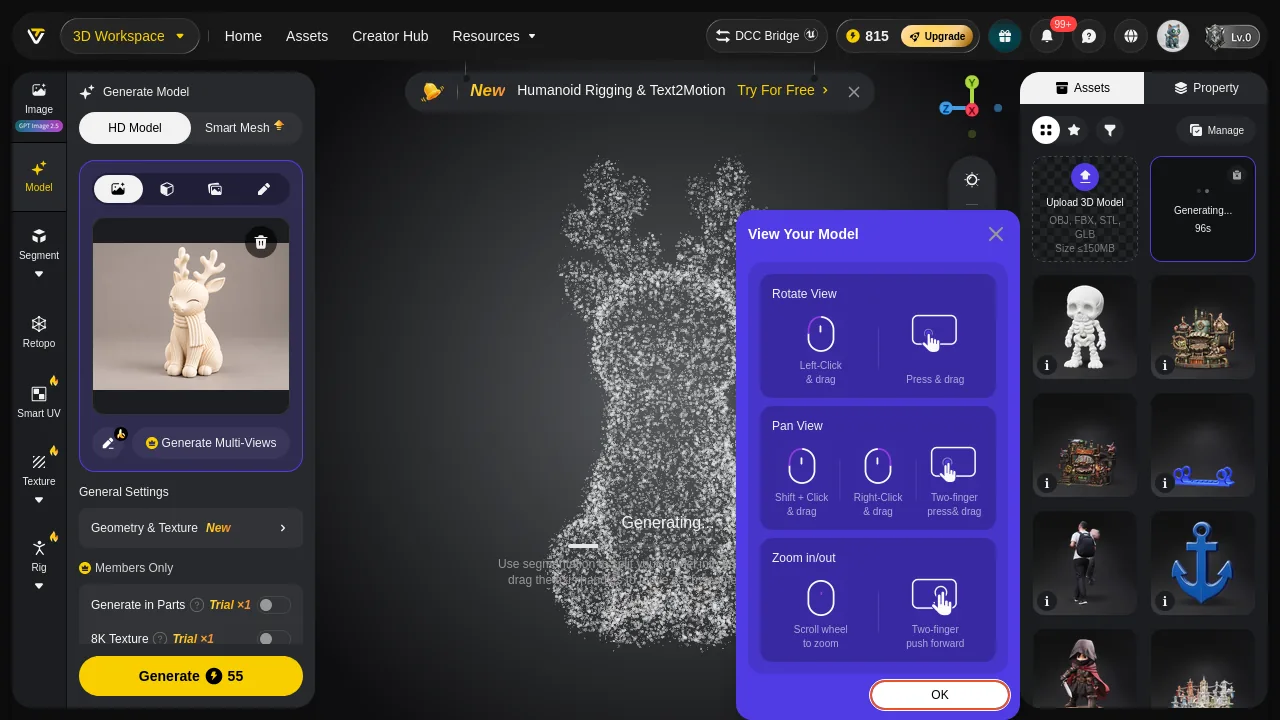 Tripo mid-generation. The balance has already dropped to 815. A Humanoid Rigging & Text2Motion promotional banner runs across the top of the viewport and a View Your Model tutorial popup sits in the middle of it, requiring a click to dismiss. The card reads 96s — that is a countdown of remaining time, not elapsed time.
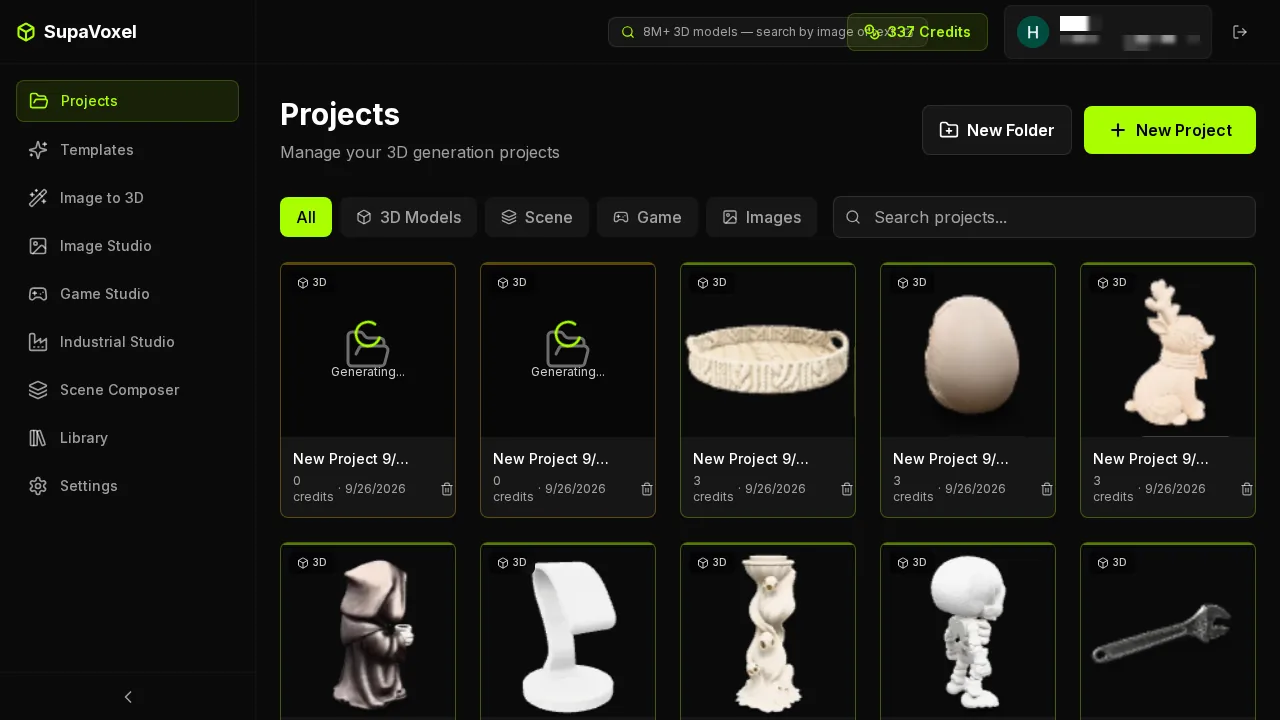 The SupaVoxel project grid. Each card carries what that job cost — 3 credits · 9/26/2026 — and jobs still running read 0 credits. One SupaVoxel flaw is visible here too: under concurrent use this grid is not reliably newest-first, and I had to open the project by id rather than by card position.
Three of Tripo's switches are rationed by trial count
Tripo's paid run is not the full product. Three switches I wanted are metered separately: Clean Topology carries Trial ×2, and in the Members Only panel, Generate in Parts and 8K Texture each carry Trial ×1. All three are off by default.
That matters for this case specifically, because Clean Topology is the switch that would have addressed the topology problems in the delivered mesh — the 2 non-manifold edges, the 2 boundary edges, the 2 connected components. Tripo's default output has those, and the fix is rationed to two uses.
SupaVoxel's Advanced Options are numeric sliders with their values on screen: Inference Steps 5, Guidance Scale 5.5. No trial counter, no members-only gate.
- Trial-rationed switches — Tripo 3 (Clean Topology ×2, Generate in Parts ×1, 8K Texture ×1) · SupaVoxel 0
- Parameters exposed as numeric values — Tripo quality presets · SupaVoxel Inference Steps 5, Guidance Scale 5.5
- Reference images per run — Tripo not measured · SupaVoxel 5 slots (1 Main + 4 angles)
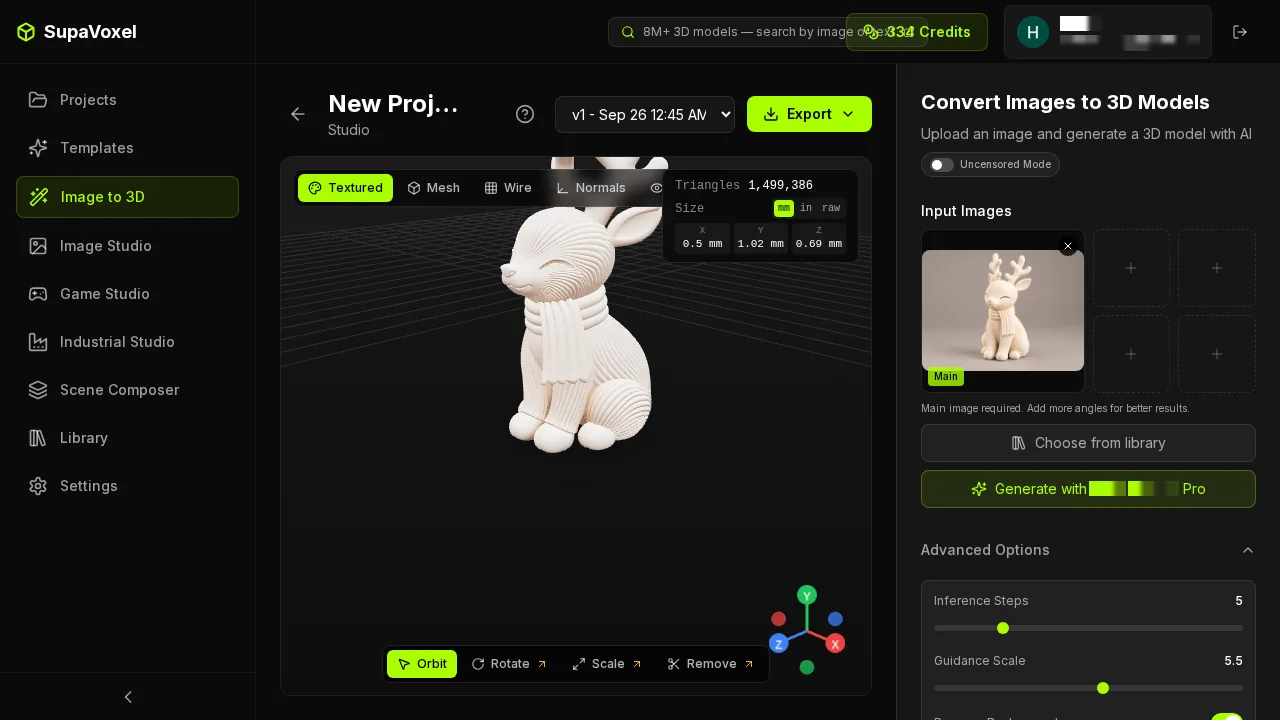 SupaVoxel Advanced Options expanded: Inference Steps and Guidance Scale as sliders with the numbers visible and editable. This run used these factory defaults, identical across all ten cases I ran — "both on defaults" is documented, not assumed.
The clock: Tripo won this subject, and SupaVoxel is usually faster
This is the row where a single case will mislead you, so here are both halves of it.
On this subject Tripo won, clearly. Tripo 157.0 seconds against SupaVoxel's 258.347 — 101 seconds, one run each on the same photograph. I am not going to soften that; it is the one row Tripo takes outright in this article.
Now the part a one-case review cannot see. I ran ten subjects through both tools, one run per tool per subject, and across those ten SupaVoxel was faster on seven of them. SupaVoxel's median was 133.6 seconds against Tripo's 163.5 — about 30 seconds the other way. This reindeer is one of only three subjects where Tripo came out ahead. If I had tested only this one, I would have told you Tripo is the faster tool, and I would have been wrong.
And the reason those two facts coexist is the interesting finding: Tripo is far more predictable. Tripo's ten runs spanned 135 to 189 seconds — a 54-second spread, tight enough to plan around. SupaVoxel's spanned 100.2 to 867.4 seconds, a 767-second spread. SupaVoxel is usually quicker and occasionally enormously slower; a scale-model tank took it 867 seconds and a watch stand 250. This reindeer, at 258, is one of those slow draws.
So: if you want the lower average wait, that is SupaVoxel. If you need to promise someone a delivery time, that is Tripo. Ten subjects, one run each, is a sample and not a statistic — but the pattern is consistent enough in both directions that I will state both.
- This subject — Tripo 157.0 s · SupaVoxel 258.347 s · 101 s to Tripo
- Faster on how many of ten subjects — Tripo 3 · SupaVoxel 7
- Median across ten subjects — Tripo 163.5 s · SupaVoxel 133.6 s
- Range across ten subjects — Tripo 135–189 s (54 s spread) · SupaVoxel 100.2–867.4 s (767 s spread)
- Basis — my own stopwatch and the on-screen states; Tripo exposes no completion timestamp and its counter counts down rather than up
What those 101 seconds cost
Now price it, on this subject, where Tripo actually won them. For 101 seconds of wall clock you pay Tripo 52 extra credits, and you receive a file that is 64.63 MB against 10.02 MB — 6.45× — which on a 12 Mbps mobile connection takes 43.1 seconds to pull down against 6.7.
Subtract the download and the 101-second lead is already down to about 65 seconds before anyone has opened a slicer. Then add the repair: Tripo's welded mesh is not watertight, its winding is inconsistent, it has 2 boundary edges, 2 non-manifold edges and 2 connected components. Patching, unifying and merging that is not free, and at that point the remaining lead is gone.
- Credits for the 101 seconds — 52 extra (55 vs 3)
- Download time for the file — Tripo 43.1 s · SupaVoxel 6.7 s at 12 Mbps
- Lead after download — about 65 s
- Repair operations required — Tripo 3 · SupaVoxel 0
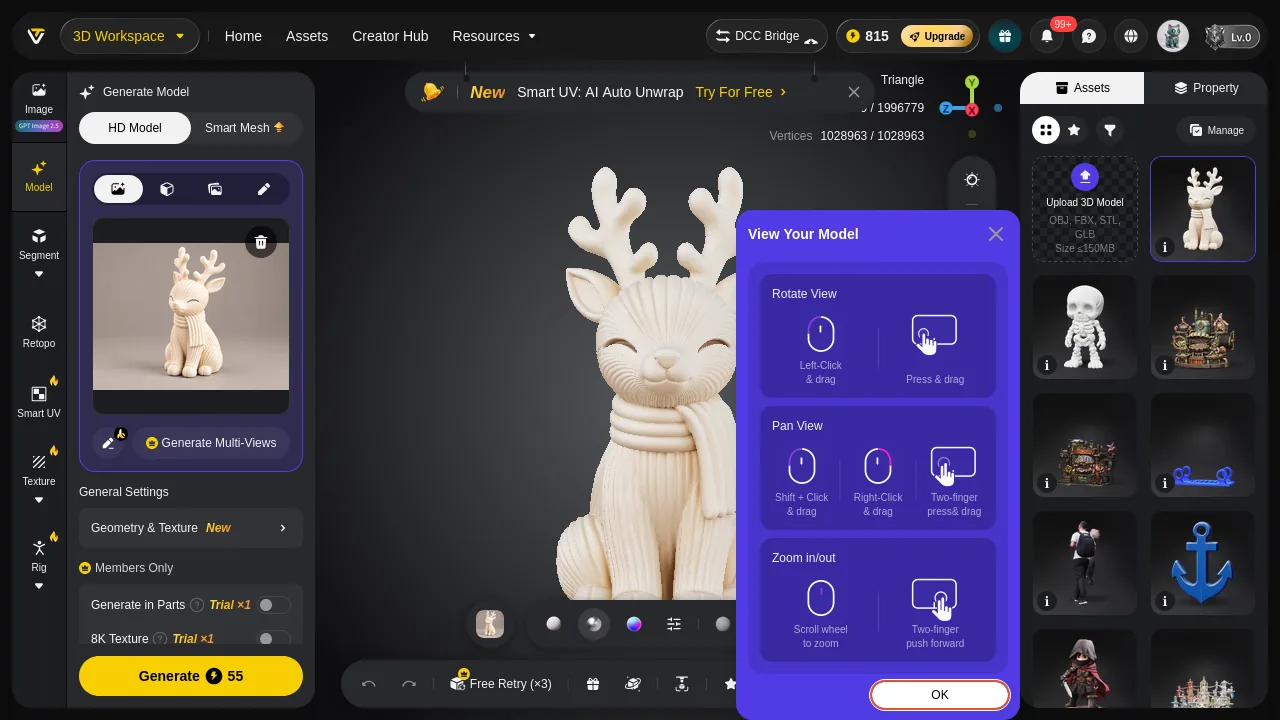 Tripo's result screen, reporting 1,996,779 triangles and 1,028,963 vertices — figures that matched the downloaded GLB exactly, so Tripo's panel does not inflate. The View Your Model tutorial popup is still parked over the model you just paid 55 credits for.
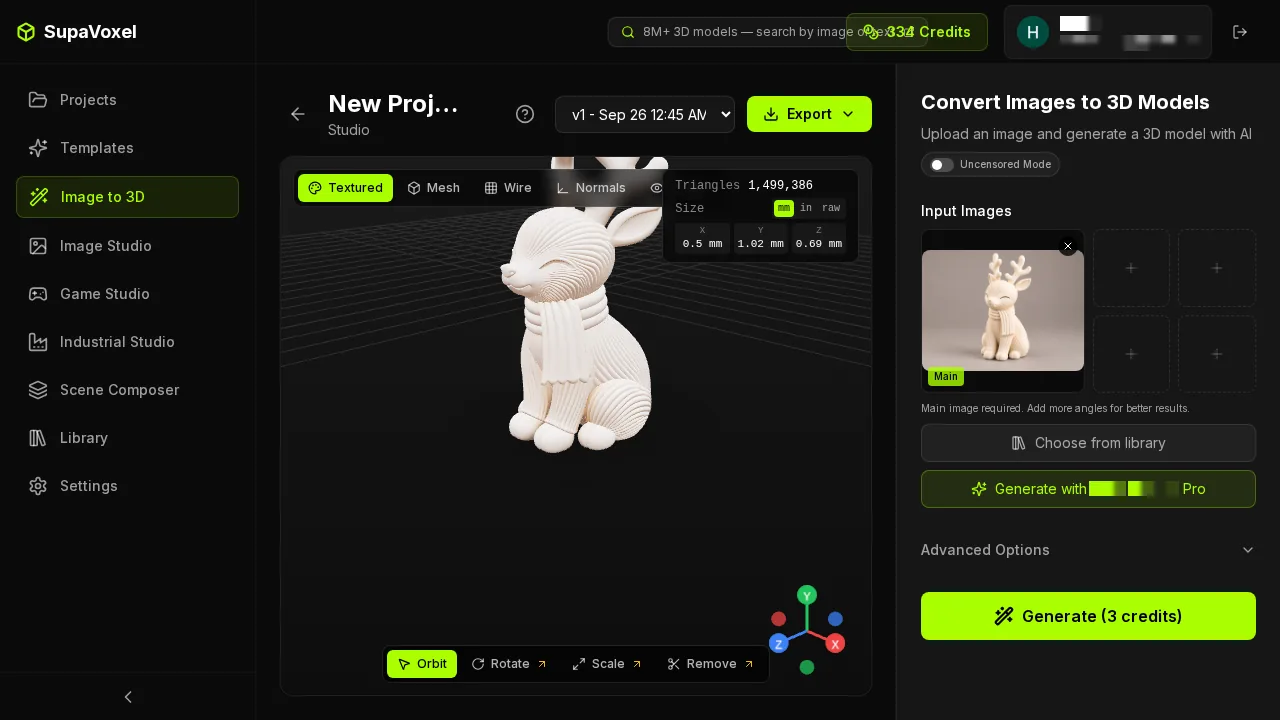 The SupaVoxel result page: an Export dropdown in the top bar, four inspection modes at top left, and 1,499,386 triangles at top right — which also matched the downloaded GLB exactly. Neither panel lies; that row is a tie.
A batch of 100: 5,500 credits against 300
One figurine is a curiosity. A hundred is a business, so here is the same run multiplied out.
Tripo: 5,500 credits, 6.46 GB of downloads, $443 of resin. SupaVoxel: 300 credits, 1.00 GB, $488 of resin.
Generation time is the row I cannot call, and I want to be exact about why. A hundred copies of this reindeer, run serially, is 4.4 hours on Tripo against 7.2 on SupaVoxel. But a hundred assorted objects lands anywhere in 3.8–5.2 hours on Tripo and 2.8–24.1 hours on SupaVoxel, going by the ten subjects I timed. Those ranges overlap, so "Tripo finishes your batch sooner" is a claim I would have to pick a subject to support.
On the median subject SupaVoxel gets the hundred done in about 3.7 hours against Tripo's 4.5 — and that median is exactly what you should not plan on, because it hides the tail that makes the whole row unanswerable. Fill the hundred with tank-shaped objects and SupaVoxel needs about 24 hours where Tripo's worst case is around 5. What survives is the predictability point: Tripo's batch time barely moves, SupaVoxel's can be eight times its own best.
Tripo is $45 cheaper in resin across the hundred. It is also 5,200 credits more expensive and 5.46 GB heavier, and every one of those 100 files arrives needing the same three repairs. At an estimated three minutes each — an estimate, not a measurement, and I am labelling it as one — that is five hours of work — more than the head start Tripo earned on this subject, and there is no head start at all on the seven subjects where SupaVoxel finished first.
- Credits for 100 — Tripo 5,500 · SupaVoxel 300 · 5,200 difference
- Download volume for 100 — Tripo 6.46 GB · SupaVoxel 1.00 GB
- Serial time, 100 of this subject — Tripo 4.4 h · SupaVoxel 7.2 h
- Serial time, 100 assorted objects — Tripo 3.8–5.2 h · SupaVoxel 2.8–24.1 h · overlapping, no winner
- Serial time on the median subject — Tripo 4.5 h · SupaVoxel 3.7 h · a median that hides the tail
- Resin for 100 — Tripo $443.00 · SupaVoxel $488.00
- Repair passes needed — Tripo 100 · SupaVoxel 0
What else you pay for in attention
Not every cost is on the invoice. Between submitting and exporting, Tripo showed two modal tutorials that must be dismissed — View Your Model during generation, then Guide with a five-video list on the viewer — plus a promotional banner across the top of the viewport that changed content between screens, plus a third-party ad strip on the landing screen.
The worst instance: clicking Export opens Tripo's export dialog with the Guide popup on top of it, covering File Name and Format. You close a tutorial to fill in the export form for the model you already paid for.
Across the same run the SupaVoxel viewport showed zero popups and zero promotional strips.
- Modal tutorials between submit and export — Tripo 2 · SupaVoxel 0
- Promotional banners in the viewport — Tripo present in generation and result · SupaVoxel 0
- Export dialog obstructed on open — Tripo yes · SupaVoxel not applicable
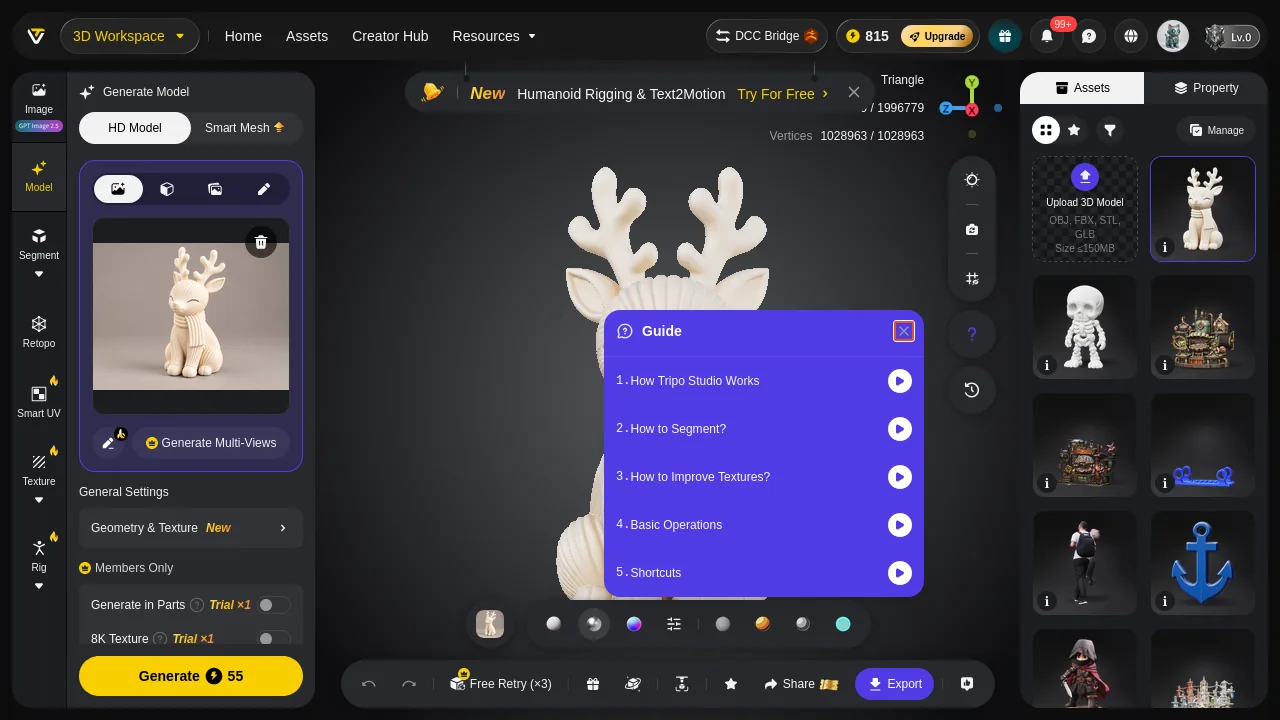 Dismiss Tripo's first popup and the second arrives: Guide, a list of five tutorial videos, again across the model. The Export, Share and Free Retry (×3) controls only become visible underneath it.
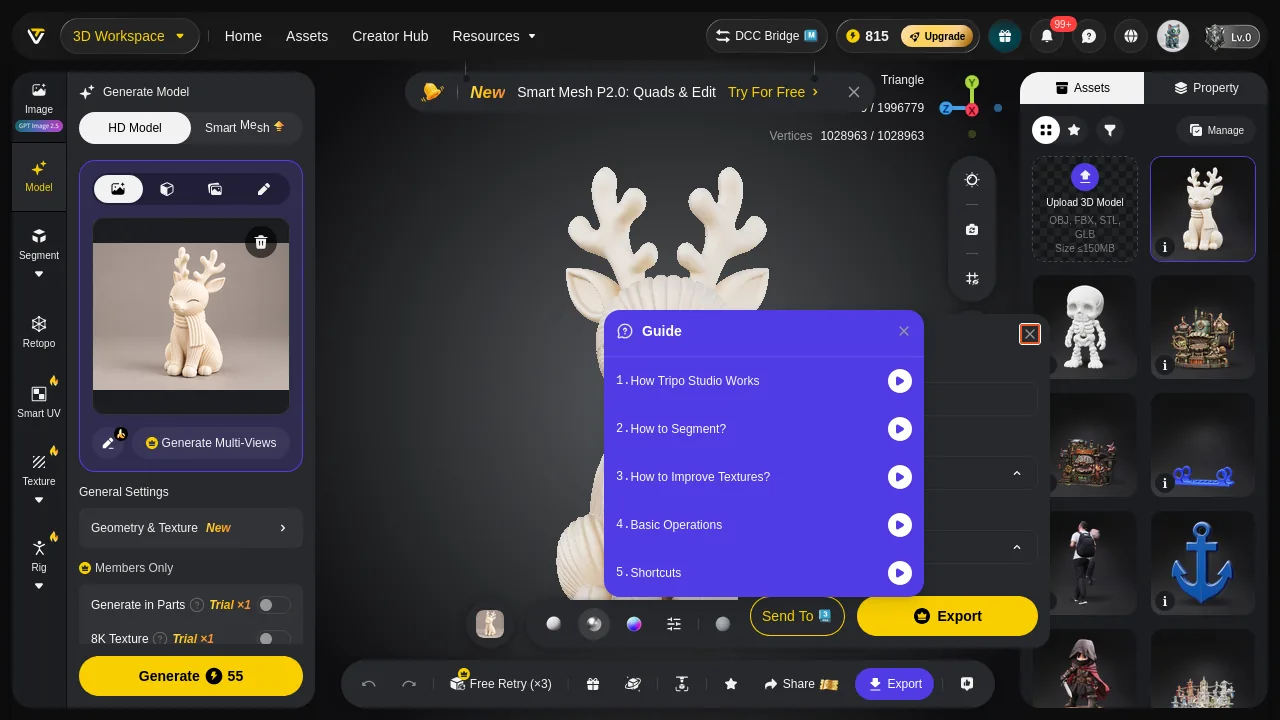 Tripo's export dialog with the Guide popup sitting on top of it. Two of the three fields are covered. This is the last screen between you and the 64.63 MB file.
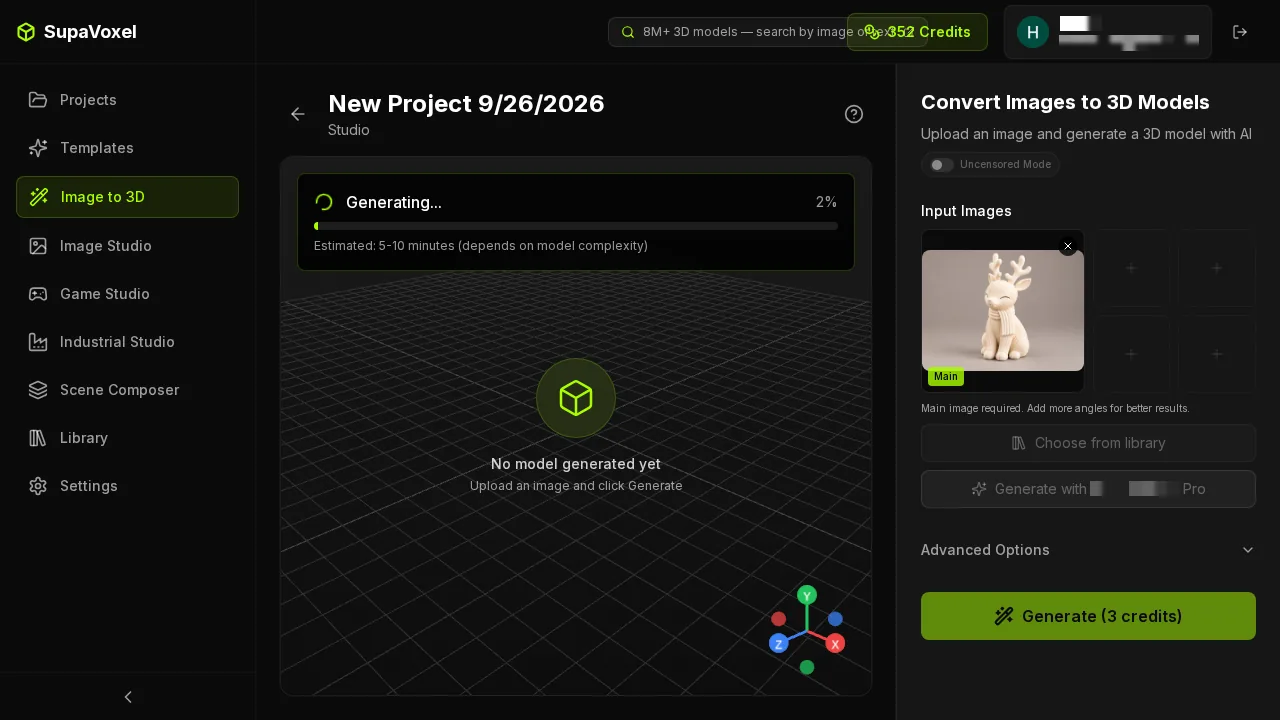 SupaVoxel generating. One numeric progress bar counting up, an estimate of 5–10 minutes, and an otherwise empty viewport. Note the direction: SupaVoxel counts up from 2%, Tripo counts down from 96s. They are not the same kind of number and should not be compared as one.
Final verdict: Tripo scores 58, SupaVoxel scores 91
Tripo won this subject on the clock — 157.0 seconds against 258.3, by 101 — and Tripo is the more predictable tool by a wide margin: 135–189 seconds across ten subjects against SupaVoxel's 100.2–867.4. Both of those are real and both are Tripo's. What is not Tripo's is a general speed claim: across those same ten subjects SupaVoxel finished first on seven and was about 30 seconds quicker on median. This reindeer is one of three where Tripo led. If your workflow is "get a first pass in front of a client, then rebuild the topology in Blender anyway," Tripo's consistency is worth money and the mesh problems are not your acceptance criteria.
For everyone else, the price of those 101 seconds is 52 extra credits per object, 54.6 MB of extra download, and a repair pass on every file. At 100 units that is 5,200 credits, 5.46 GB and 100 repairs — against a head start that only exists on some subjects and, on this one, is smaller than the repair time it creates. Tripo also hides the price until you upload, takes the credits at submit rather than at delivery, and rations the one switch that would have fixed the topology to two uses.
Tripo: 58/100. SupaVoxel: 91/100.
Which one I would use for this job
If you are generating more than one of these, use SupaVoxel. 3 credits instead of 55, the price on the button before you upload, per-job cost printed on the project card, nothing deducted while a job is running, no trial-metered switches, five reference slots instead of one visible one, and a file that arrives watertight and ready to slice.
Three things to hold against SupaVoxel honestly: it lost the clock on this subject by 101 seconds, and its run times are far less predictable than Tripo's — 100 to 867 seconds across ten subjects, so a slow draw is a genuine risk even though the median favours it. Its output carries no real-world units, so you scale it yourself before printing. And the project grid is not reliably newest-first when several jobs run at once — I got bitten by that in this very run.
Originally published on Medium: Tripo AI Image to 3D Review 2026: 18.3x the Credits for 101 Seconds.